
Android 17 Brings Custom Shortcuts to the Pixel Launcher Search Bar
Google Expands Personalization Options in Android 17 Beta 1 — Though Some Features Are Still Buggy

What Happened
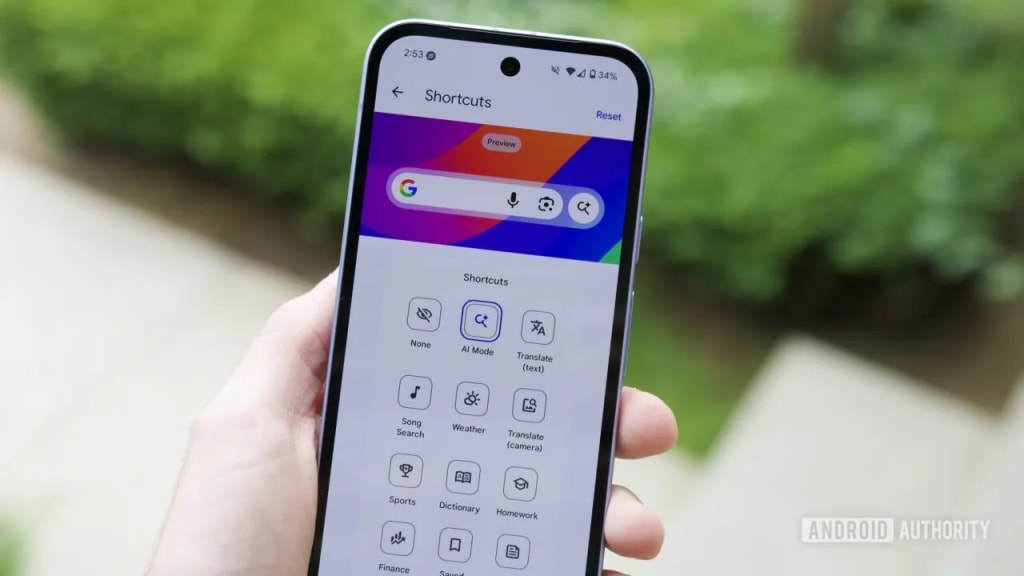
With the release of Android 17 Beta 1, Google has introduced a long-requested customization feature to the Pixel Launcher search bar, aligning it more closely with the functionality already available in the Google Search widget.
Previously, Pixel users had two primary search interfaces on the home screen: the persistent search bar built into the Pixel Launcher at the bottom of the screen, and the movable Google Search widget. While the widget allowed users to customize one of its shortcut buttons, the Pixel Launcher search bar did not offer that flexibility.
That changes in Android 17 Beta 1.
Users can now customize one of the shortcut buttons within the Pixel Launcher search bar, similar to how they can modify shortcuts in the standalone Google Search widget. By default, both search bars typically include quick access to voice input, Google Lens, and AI Mode. The new update allows users to replace the AI Mode shortcut with another option of their choosing.
This feature has reportedly been a user request since at least mid-2025, with many Pixel owners expressing frustration that the built-in launcher search bar lacked parity with the widget version.
At present, however, the feature’s implementation appears somewhat inconsistent. Early testers report that not all shortcut options function reliably in the beta build, suggesting further refinements are likely before the stable release of Android 17.
Google has not yet announced an official timeline for Android 17’s stable rollout, though beta updates typically precede final release by several months.
Why It Matters
On the surface, customizable shortcuts may seem like a minor tweak. But the change reflects a broader shift in how Google approaches Android personalization — particularly within the Pixel ecosystem.
For years, Pixel Launcher has prioritized simplicity and consistency over deep customization. While third-party launchers have offered extensive configuration options, Google’s first-party experience has tended to limit user control in favor of a streamlined design philosophy.
Allowing shortcut customization in the launcher’s search bar signals a subtle pivot toward greater flexibility without abandoning core design principles.
There are several practical implications:
1. Reducing Redundancy Between Search Surfaces
Google has layered multiple search entry points across Android devices: Chrome, the Google app, app drawer search, voice assistants, and home screen search bars. By unifying feature sets between the Pixel Launcher search bar and the Google widget, Google reduces fragmentation and confusion between these overlapping tools.
Consistency improves usability — especially for users who rely heavily on home screen search shortcuts.
2. Responding to AI Integration Fatigue
The ability to swap out the AI Mode shortcut may also reflect sensitivity to user feedback regarding AI features. As Google continues integrating generative AI across Android, some users prefer more control over which AI tools appear in prime interface locations.
Customization allows Google to promote AI functionality while giving users the option to deprioritize it.
3. Competitive Pressure in Android Customization
Android’s openness has long been a defining advantage over competing platforms. However, within Google’s own Pixel software experience, customization has sometimes lagged behind what third-party Android skins or launchers offer.
Small quality-of-life improvements — like customizable search shortcuts — help Pixel maintain appeal among users who expect both simplicity and control.
4. Beta Instability Signals Ongoing Iteration
The reported glitches in Android 17 Beta 1 highlight the balancing act between rapid feature rollout and software stability. Beta releases are designed for experimentation and feedback, and Google will likely refine the shortcut behavior before final release.
This iterative approach reflects the increasingly modular nature of Android updates, where features can be adjusted or patched post-launch through system updates.
The Bigger Picture
Android 17’s customization update may not be revolutionary, but it represents incremental progress in user-centric design.
As smartphone interfaces mature, dramatic UI overhauls become less common. Instead, evolution happens through targeted refinements that address specific friction points. In this case, Google is harmonizing two similar search experiences and granting users slightly more autonomy over their home screen layout.
In a competitive smartphone market where differentiation often hinges on subtle experience improvements, even small customization changes can influence user satisfaction and brand loyalty.
If Google continues this trend — blending AI integration with optionality rather than mandate — Android 17 could mark a phase of more flexible, user-aware system design.
For now, Pixel users in the beta program can test the feature early — with the understanding that full polish will likely arrive closer to Android 17’s stable launch.
About the Creator
Keep reading
More stories from Behind the Tech and writers in Futurism and other communities.
Anthropic’s AI-Built C Compiler Sparks Hype — and Skepticism
What Happened Anthropic has announced that a team of 16 AI agents powered by Anthropic’s Claude Opus 4.6 model built a Rust-based C compiler from scratch, reportedly without access to the internet.
By Behind the Techabout an hour ago in Futurism
Pea Starch Market Outlook: Plant-Based Ingredient Demand and Sustainable Food Growth Opportunities
According to IMARC Group's latest research publication, the global pea starch market size reached USD 151.4 Million in 2024. Looking forward, IMARC Group expects the market to reach USD 263.1 Million by 2033.
By James Whitmana day ago in Futurism
The Pride Flag and the Diversion
For nearly a decade, the LGBTQIA Pride Flag rippled in the wind at Christopher Park, a kaleidoscope of color staked into the soil of America’s first national monument to LGBTQIA+ liberation. That flag came down this week. Federal officials, citing new guidance from the Trump Administration, silently lowered the rainbow flag from its pole across the street from the Stonewall Inn. The birthplace of the modern gay rights movement now flies only the United States flag.
By Tim Carmichael3 days ago in Pride



Comments
There are no comments for this story
Be the first to respond and start the conversation.