
How to Transition from a Prototype to a Scalable Mobile App
A practical, technical prototype-to-production roadmap - covering architecture, APIs, testing, security, and release discipline - so your mobile app can grow without breaking.


A prototype can feel like a win, until real users show up with real devices, weak networks, and zero patience. In 2025, the app economy hit about 112.1 billion downloads, so your users always have alternatives. And uninstall rates stayed high at about 46.1% in 2024, which is basically people saying “nah, not worth it.” If you want to transition from a prototype to a scalable mobile app, you need more than polish. You need a build that can grow without breaking.
This guide is a practical, technical path from demo to durable product, for startups and enterprise teams.
Transition From Prototype to Scalable Mobile App
Most prototypes are built to prove a point fast. That’s fine. But production apps must survive traffic spikes, messy data, OS updates, and security reviews, all at the same time.
Here is the mindset shift that matters:
- Prototypes optimize for speed of learning
- Production apps optimize for stability and repeatability
- Scalable apps optimize for change, because change never stops
If you are doing mobile app development for enterprise, the bar is higher. You will need stronger controls, auditability, and predictable releases, not just “it works on my phone.”
A clean prototype-to-production transition usually has two tracks running together:
- Product clarity: what stays, what goes, what becomes a v2
- Engineering readiness: architecture, testing, security, and operations
Now let’s define what “scalable” actually means, because teams argue about it a lot.
What “Scalable” Means for Your Product
“Scalable” is not only about handling more users. It is also about handling more change without chaos.
Start by writing down your scale targets. Keep them simple and measurable:
- Expected monthly active users in 6 and 18 months
- Peak requests per second for your top 3 APIs
- Data growth rate per user (images, events, logs)
- Regions you will support, if any
- Compliance needs like SOC 2, HIPAA, PCI, or internal policies
Then decide what you scale first. Most teams should prioritize reliability before fancy features. A stable app keeps users, and that’s the point.
Here is a quick “scalability definition” template you can reuse:
- The app supports 10x users without redesigning core services
- Releases happen weekly with low rollback risk
- The team can debug incidents in under 30 minutes
- The system has clear ownership and clear boundaries
This planning step reduces rework later. It also gives finance and leadership a real number to fund.
Once scale goals are clear, you can audit the prototype like it is already in production, because soon it will be.
Audit The Prototype Like a Production Engineer
A prototype audit is not a code roast. It is a map of what you keep and what you rebuild.
Build A Prototype Reality Checklist
Review the prototype against these areas:
- Authentication and session handling
- Data model quality and migrations
- API contracts and error handling
- Offline behavior and slow network handling
- Performance on older devices
- Third party SDK risk and cost
- Logging, metrics, and crash reporting
Also check the UX for “demo shortcuts”:
- Hardcoded values
- Fake loading states
- Missing empty states
- Missing permission flows
- No accessibility pass
If you are using a single shared environment and a single database, call it out now. That setup collapses when multiple teams start shipping.
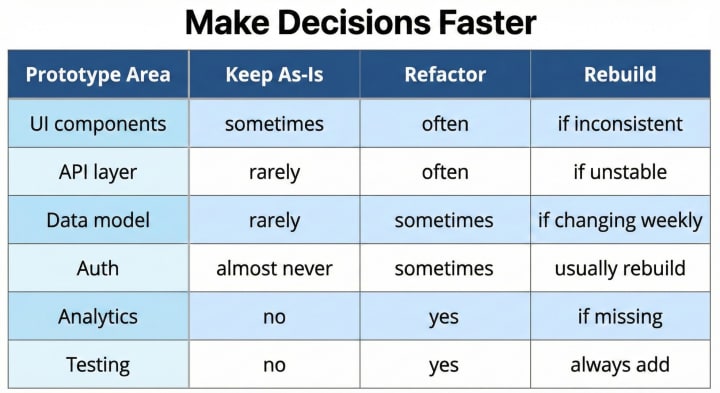
If you are honest in this table, you save months. If you lie to yourself, you pay later.
After the audit, you rebuild the core. Not everything, but the parts that decide stability.
Rebuild The Architecture with Clear Boundaries
Scaling fails when everything depends on everything. You want boundaries so teams can change one part without breaking the whole app.
A practical baseline architecture for a scalable app:
- A client layer that stays thin and predictable
- A domain layer with business rules and validation
- A data layer with caching, retries, and typed contracts
- A backend split into services by business capability, not by database tables
This is also where App scaling becomes real. If your data access is a random mix of calls, no amount of servers will save you.
Make One Hard Choice Early: State Management
Choose a state pattern that matches your complexity:
- Small app: simple local state plus a few shared stores
- Medium app: centralized store with strict boundaries
- Complex enterprise app: feature based modules, strict data flow, and event logging
Whatever you pick, document it. Teams break patterns when patterns are not written down.
Also, decide your approach to backend changes. Version your APIs or version your clients, but do not rely on hope.
If your prototype was built in a rush, this is where you often start fresh. And yes, it can still be fast if you use templates and a clean repo setup.
This is where you typically restart mobile app development plans, but keep what you learned.
Architecture is the skeleton. Data and APIs are the blood. If they are messy, the app gets sick fast.
Data, APIs, And Sync That Will Not Break At Scale
Most production issues come from data inconsistencies, not UI bugs. So treat data as a product.
Lock Down Your Contracts
Do these things early:
- Use typed API schemas (OpenAPI, protobuf, or a strict JSON schema)
- Standardize error formats across services
- Return stable pagination structures
- Add idempotency for write endpoints
- Define rate limits and timeouts
For the client side, build a network layer that always:
- Retries safely when it should
- Fails fast when it must
- Surfaces user friendly messages
- Logs enough context for debugging
If you are doing mobile app development, add caching rules for every major screen. Decide what is safe to cache and for how long.
Offline And Sync Rules
You do not need full offline mode for every app. But you do need predictable behavior on weak networks.
Define these states:
- Online: full read and write
- Degraded: read works, writes are queued
- Offline: limited, with clear messaging
If you skip this, users will see spinning loaders forever, and they uninstall.
This is the second place where App scaling shows up. More users means more network variability. Your app must stay calm.
Once data flows are stable, you can clean up UX and UI so the app feels consistent, not stitched together.
Design System and UX Cleanup Without Rework
You can scale faster when your UI is built from stable components. It reduces bugs, and it makes the app easier to change.
Build A Small Design System
You do not need a huge library. Start with:
- Typography scale and spacing rules
- Buttons, inputs, toggles, lists, cards
- Standard states: loading, empty, error, success
- Icons and their usage rules
- Accessibility defaults like touch target sizing
Then enforce it in code review. If you do not enforce it, you do not really have a system.
Reduce Flow Complexity
Prototypes often have “extra” screens to explain things. Production apps should be more direct.
A quick flow cleanup checklist:
- Remove repeated confirmations
- Combine screens that do one small thing
- Ensure every screen has one clear primary action
- Add empty states that guide the next step
- Make permission prompts appear only when needed
If you keep UX clean, mobile app development gets easier because engineers are not rebuilding the same screen in five ways.
Now we make it safe to ship. That means testing, release control, and observability.
Quality Engineering: Testing, Release, And Observability
If your prototype had little testing, that is normal. But production needs layers of protection.
Build The Testing Pyramid That Actually Works
Start small, then grow:
- Unit tests for pure logic, formatting, validators
- Integration tests for API clients and repositories
- End to end tests for the top 2 user journeys only
- Regression tests for high risk flows like auth and payments
Avoid creating hundreds of fragile UI tests. They waste time and people stop trusting them.
Release Discipline
Production teams need a release pipeline that answers one question: can we ship without guessing?
Minimum release controls:
- CI builds on every merge
- Automated tests run on every PR
- Feature flags for risky features
- Staged rollout with monitoring gates
- Fast rollback path
This is the real prototype-to-production work. It is not glamorous, but it saves you at 2 a.m.
Observability Basics
Add these before your first big launch:
- Crash reporting
- Network error logging
- Core performance metrics (startup time, screen render time)
- Server metrics and alerting (latency, error rate, saturation)
If you cannot see it, you cannot fix it.
Quality is not complete without security and store readiness, because app stores and enterprise security teams both have opinions.
Security, Privacy, And Store Readiness
Security is partly engineering, and partly product decisions. Also, app store review expects you to respect safety, performance, and legal rules, so read the platform guidance early. (Apple Developer)
Secure The Basics First
Do not overcomplicate. Do the basics well:
- Use secure storage for tokens and secrets
- Enforce TLS and certificate best practices
- Validate inputs on server and client
- Apply least privilege to APIs and admin tools
- Keep dependencies updated and scanned
Privacy And Permissions
Ask for permissions only when needed. Not at launch. Users hate that.
Also, document:
- What data you collect
- Why you collect it
- Where it is stored
- How users can delete or export it
For enterprises, add admin controls and audit logs. Those are not “extra.” They are the product.
This is also where mobile app development gets blocked late if you ignore it. Security reviews can delay launch by weeks.
Now let’s talk about people and process, because scaling is also a team problem.
Team, Process, And Budget Planning for Growth
A prototype is often built by a small team, sometimes one person. A scalable app needs clear ownership and a steady delivery rhythm.
Team Roles That Matter
You do not need a big org chart. But you do need these functions covered:
- Product owner who can make scope calls
- Engineering lead who enforces architecture boundaries
- QA or quality owner who owns test strategy
- DevOps or platform owner for CI and monitoring
- Security reviewer, even if part time
If you skip ownership, decisions drift. Then you redo work.
Budgeting For Scale
Plan for these recurring costs:
- CI and device testing infrastructure
- Analytics and observability tooling
- Third party APIs and SDK fees
- Support, moderation, or trust work
- Compliance audits if required
This is a third place where App scaling shows up. Traffic growth raises infra costs and support load. Plan it, don't pretend it will stay flat.
Let’s make it actionable with a checklist you can run in a real sprint plan.
A 60-Day Prototype to Scale Checklist
Use this as a working plan. Adjust timelines based on complexity.
Days 1–15: Stabilize Requirements and Foundations
- Freeze the core v1 scope and remove extras
- Finalize scale targets and risk tier list
- Decide architecture patterns and repo structure
- Define API contract standards and error formats
- Set up CI, linting, and baseline tests
Days 16–35: Rebuild Core Systems
- Rebuild auth and user identity flows
- Implement data layer with caching and retries
- Add offline or degraded mode rules
- Create shared UI components and tokens
- Add analytics events for core journey
This is where the second prototype-to-production push usually happens, and it can feel heavy. Keep it tight.
Days 36–60: Hardening and Launch Readiness
- Load test your top APIs and fix bottlenecks
- Add end to end tests for core journeys
- Add dashboards and alerts for key metrics
- Run security review and dependency scan
- Do staged rollout, then expand
If you do this checklist seriously, you enter launch week with fewer surprises. Not zero surprises, but fewer.
Even with a plan, teams still make the same mistakes. So let’s call them out.
Common Failure Modes and How to Avoid Them
1. Keeping Prototype Shortcuts “Just for Now”
It rarely stays temporary. Remove the shortcut or document it with a fix date and owner.
2. Overbuilding Too Early
Do not build a complex microservice setup if you have one core workflow. Scale can be planned without adding needless parts.
3. Ignoring Data Migrations
When data changes weekly, migrations matter. Add versioning and migration scripts early.
4. Too Many SDKs
Each SDK adds risk, performance cost, and policy review overhead. Add only what you can justify.
5. Shipping Without Observability
If you ship blind, you will debug blind. Add basic monitoring before your first big user push.
This is where mobile app development teams either mature fast, or they end up stuck in fire drills.
Finally, let’s talk about partnering, because some teams need extra capacity to move fast without cutting corners.
Final Thoughts and Partnering Options
A prototype proves demand. A scalable app proves you can deliver value repeatedly. The difference is discipline, not luck.
If you want a practical rule, use this one: rebuild the risky core, keep the validated UX, and add strong quality gates. That is the cleanest prototype-to-production path for most teams.
When internal bandwidth is tight, working with a custom mobile app development company can help you move faster on foundations like architecture, CI, testing, and security hardening. It works best when ownership stays with your team and the partner supports execution, not decisions.
If you keep your scope realistic, measure the right metrics, and build for reliability, you can scale without doing a “full rewrite” every year. And that’s the real win.
About the Creator
Dhruv Joshi
Tech Content and Mobile and Web app Developer - Solutions provider - Avaialble to cunsualt for free! 50m+ downloads so far
Keep reading
More stories from writers in FYI and other communities.
The Lesions of Devotion
Every day I set myself down on the freshly cut lawn and strip myself bare. I take my guitar and finger the frets and pick at the strings, listening for dissonance. My life is dissonance. I twist the tuning pegs until each string sounds bright. Then I kneel, calves pointing behind me, kneecaps facing forward. All exposed to the breeze. I close my eyes and play the melody.
By Paul Stewart4 days ago in Fiction


Comments
There are no comments for this story
Be the first to respond and start the conversation.