
A Step By Step Guide To A Sidehustle That made Me $5,320.19
How I turn ideas into income. (learn, start and grow.)


I never thought I’d say this,
But one of the simplest decisions I made ended up adding $5,320.91 to my bank account.
Because when I first got into this side hustle, I wasn’t sure if it would even work.
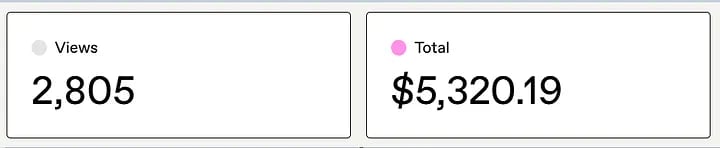
And a little over a month later, here I am, writing this after staring at my Gumroad dashboard: $5,320.19 earned
I know it is not life-changing money, but it is definitely eye-opening.
The side hustle I am talking about is creating and selling digital products.
And in this story,
I want to share the step-by-step process of how it all happened.
So, you can replicate it.
I’ll be showing you:
- How I came up with product ideas
- How I actually created the product
- How I wrote a simple sales copy that converted
- Where I listed my products
- And finally, how I marketed them to make sales fast
I am going to be showing you my personal playbook, step by step.

Without wasting any time, let’s dive right in to it!
Step 1: Finding Your Digital Product Idea
The hardest part for beginners is knowing what product to create.
This is where ChatGPT became my business partner.
Here’s what I did:
I opened ChatGPT and typed: Give me 10 digital product ideas in the productivity niche that people would pay for.
ChatGPT gave me a goldmine:
- planners,
- eBooks,
- templates,
- and more.
I personally went with digital planners and guides because people are always looking for ways to organize their life and work better.
Don’t overthink it. People are willing to pay for simplicity, a guide, a template, or a planner that saves them time.
Step 2: Creating the Product
Once I had my idea, I moved into creation. I use a simple system:
- ChatGPT → to generate content and structure (e.g., an outline for a productivity guide).
- Notion: For structured templates (planners, trackers, systems).
- Canva → For visual products (ebooks, guides, checklists, workbooks).
For Example: The Daily Productivity Planner
Here’s exactly how I made it:
1. Ask ChatGPT for a structure
I typed:
(Create a daily productivity planner with sections for priorities, tasks, time-blocking, and reflections.)
It gave me a clear structure with 5 sections: Top 3 Priorities, Task List, Schedule, Notes, and End-of-Day Reflection.
2. Build it in Notion
I took that structure and built a template in Notion where users could simply duplicate it into their own workspace. This made it interactive for people who love digital planning.
3. Design it in Canva
For people who prefer printable planners, I recreated the same layout in Canva with clean fonts, soft colors, and boxes for each section. Within 30 minutes, I had a beautiful, professional-looking PDF ready to go.
I don’t aim for perfection; I focus on making it simple, useful, and visually appealing.
Because buyers appreciate clarity over clutter.
Step 3: Writing Sales Copy That Sells
This was a big one.
At first, I thought sales copy meant long, hyped-up writing.
But what I learned is people just want to know three things:
1. What is this?
2. Why do I need it?
3. How fast will it help me?
Example formula I use:
- Problem: Struggling to stay consistent with your daily routine?
- Solution: This productivity planner helps you stay on track in under 5 minutes a day.
- Result: Save hours weekly and finally stick to your goals.
Short and clear—that’s what sells.
I went back to ChatGPT and asked:
Write a short, persuasive product description for a daily productivity planner that helps busy entrepreneurs save time and stay organized.
Here’s the copy it gave, which I tweaked slightly:
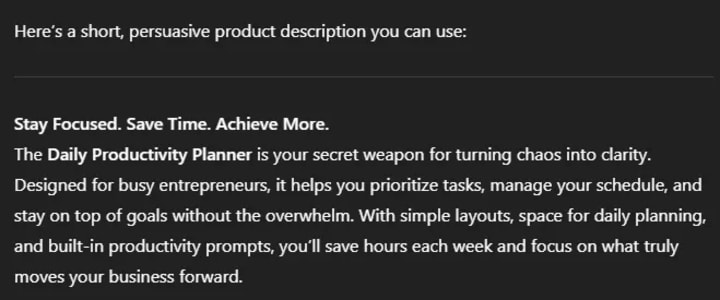
I kept it short, benefit-driven, and added a simple CTA:
Download instantly. Start organizing your day today.
Step 4: Listing the Product on Marketplaces
You don’t need a fancy website to start selling digital products. I uploaded mine to Gumroad because:
I uploaded the Daily Productivity Planner on Gumroad because it’s super beginner-friendly.
Here’s what I did:
- Uploaded the PDF and Notion link.
- Added the sales copy + a few product screenshots created in Canva.
- Set the price at $9 for the PDF and $12 for the Notion version.
Within 30 minutes, my product was live and ready for buyers.
Other marketplaces that I used are Etsy and Payhip.
same product but a different market for me to maximize my sales.
So, keep your product cover image clean and clear. Canva has pre-designed covers that you can customize in minutes.
Step 5: Marketing & Making Sales Fast
Okay, here’s the fun part. You don’t just upload and wait for sales—you need eyeballs on your product.
Here’s what worked for me:
Here’s how I promoted my Daily Productivity Planner without ads:
1. Pinterest → I created 5–6 pin designs showing mockups of the planner. Pinterest is HUGE for planners and templates.
I use simple canva-made graphics
2. Medium
This was my secret weapon.
Medium already has traffic, and you can read about productivity and self-improvement. I wrote articles like
- 5 Productivity Hacks I Wish I Knew Earlier
- How I Organize My Day as a Busy Entrepreneur
Inside each article, I naturally mentioned the Daily Productivity Planner and linked back to my Gumroad page.
3. Email list: I build an email list and send helpful weekly emails with my product as a resource.
What I did was I shared value first, then naturally pointed to the product as the solution.
What I mean about value is that I could do anything that I know is helpful.
like creating a few products and giving them out for free and then later promoting my premium products.
My Earnings So Far
Total earned: $5,320.19,
mostly from this one product plus a few spin-offs I later created
like a weekly planner and content calendar.
Conclusion
If you’ve been thinking of starting a side hustle,
Creating and selling digital products is one of the fastest, lowest-cost ways to begin.
You don’t need to be a tech person.
You just need a laptop, Canva, and ChatGPT as your assistant.
And who knows? Maybe your first $100 online will turn into $5,000+ like it did for me.
So let me ask you:
If you were to launch a digital product this week, what would it be?
Read more.
How to make $100 a Day from Affiliate Marketing Easily
How To Make Money Online On Pinterest—6 Ideas
My 4 Digital Products That Make Four Figures Every Single Month
About the Creator
ELIA MWAPINGA
I'm ELIA MWAPINGA, a passionate blogger & marketer with a unique approach to creating valuable content.
Keep reading
More stories from ELIA MWAPINGA and writers in Journal and other communities.
Building Recurring Revenue With an Affiliate Blog: My 2025 SEO-Driven Strategy Explained
The 3:47 AM Notification That Changed Everything It’s 3:47 AM on a Tuesday in Denver. Sarah Chen’s phone buzzes on her nightstand—another commission notification. This one’s for $347 from a blog post she wrote eight months ago about productivity software for remote teams. She hasn’t touched that article since hitting publish, yet it’s generated over $12,000 in recurring affiliate commissions this year alone.
By ELIA MWAPINGA4 months ago in Journal
~ Fired ~
— Ai Intrusion ~ Are you Next ~ Is Ai Evolution after your job? — Few workplaces haven't been affected. Ai is in supermarkets, at doctors' offices, and even monitoring farms. I just can't think of anything this machine is not getting into, can you? For instance: Education ~ Law and Tech jobs will one day have a major influence or be taken over by these inanimate machines, with accuracy and vigor. From mechanics' diagnoses to a wide variety of everyday jobs, including fast food workers, with this input having the ability to cut their unnecessary work hours. I'm certain all of us have been touched by this with our short stories and colorful headings, have you? Even comments are very questionable 'Non-Robot' insertions.
By Jay Kantor5 days ago in Journal
Self Help: Grifters' Gospel
On Self-Help, Snake Oil, and the Illusion of Change Psychology professionals and students can be imagined on two opposite sides of a line called self-help books: likely a larger group opposes pop-science and step-by-step manuals filled with talk of success, journaling, and not giving a f**k; others love them, but they aren’t many.
By Avocado Nunzella BSc (Psych) -- M.A.P 4 days ago in BookClub


Comments
There are no comments for this story
Be the first to respond and start the conversation.