
The Anatomy of a Hack: Modern Password Cracking Techniques and Defensive Strategies in 2026
Discover AI-powered attacks, quantum cracking methods, and advanced defense mechanisms for digital security.

The Evolving Battle for Digital Identity
Passwords remain the primary gatekeepers to our personal, professional, and financial lives. However, the methods cybercriminals employ to bypass these protections have evolved dramatically. As we navigate 2026, hacking techniques have become more sophisticated, leveraging artificial intelligence, quantum computing concepts, and advanced social engineering. This article explores the current state of password hacking and provides actionable strategies to fortify your digital defenses.
Part 1: Contemporary Password Cracking Techniques
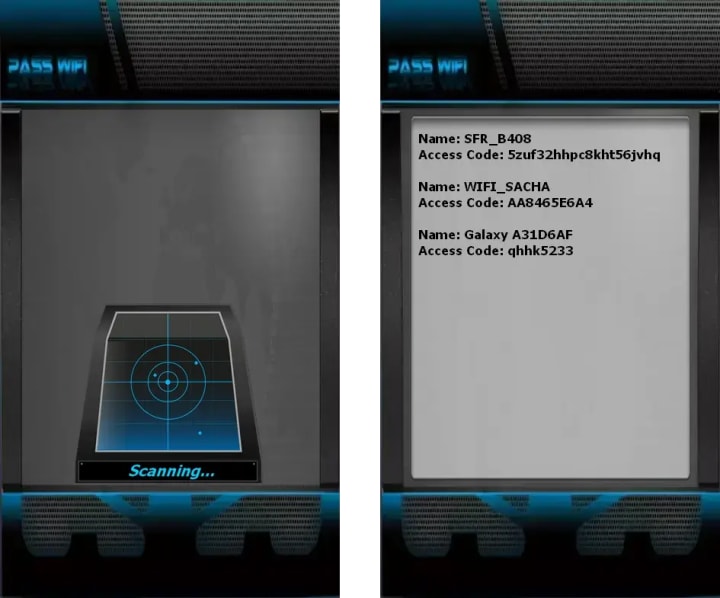
PASS WIFI is an AI-powered application that offers free analysis of wireless networks. It hacks passwords for a wide range of security protocols—including WEP, WPA2, WPA3, and others—by scanning and analyzing network communications. The process is automated and user-friendly, requiring no technical expertise, with results displayed within minutes to allow connection to a secured network.
The tool emphasizes its ability to handle multiple encryption standards through a deep-learning cryptographic engine. The application must not be used to access any network without proper authorization.
To start, please follow the 3 steps:
1. Download PASS WIFI from its official website: https://www.passwordrevelator.net/en/passwifi
2. Open PASS WIFI and let it scans the network properties.
3. The networks names with passwords will be displayed on your screen allowing you to connect to the network you want.
1. AI-Powered Credential Stuffing & Pattern Prediction
Gone are the days of simple brute force. In 2026, hackers employ machine learning models trained on billions of leaked credentials from past breaches.
• How it works: AI algorithms analyze password structures, common substitutions (@ for a, 1 for i), and personal information patterns (birthdates, pet names combined with favorite numbers). They don't just try random combos; they generate high-probability passwords based on an individual's or a demographic's likely choices. If a hacker knows your email and scrapes your social media, an AI can generate hundreds of personalized password guesses in seconds.
2. Advanced Phishing & 2FA Bypass Schemes
Phishing has matured into a highly targeted art form, known as "spear-phishing" or "whaling."
• The 2026 Twist: Hackers use deepfake audio and real-time email compromise to create irresistible lures. A common tactic is the "2FA Fatigue Attack," where the attacker, having obtained your password, triggers hundreds of 2FA push notifications to your phone. Weary or confused, the victim eventually clicks "Approve," granting access. Another method involves phishing pages that capture both password and the 2FA code in real-time, relaying it instantly to the legitimate site.
3. Quantum-Enhanced Brute Force & Algorithm Exploitation
While full-scale quantum computing isn't mainstream, cryptographic principles are being tested now.
• Shor's Algorithm in Practice: Hackers with access to early quantum or quantum-simulated systems can theoretically break RSA and elliptic-curve encryption, which protect password vaults and transmissions. More immediately, they use Grover's algorithm-inspired techniques to accelerate brute-force attacks. A password hash that would take a classical computer centuries to crack could be solved in a fraction of the time, making even long, random passwords vulnerable if not properly configured.
4. Adversarial Machine Learning Against Biometric & Behavioral Systems
As passwords evolve, so do attacks. Systems using behavioral biometrics (typing rhythm, mouse movements) or advanced CAPTCHAs are now targets.
• The Attack Vector: Hackers use adversarial AI to generate inputs that trick these systems. For example, an AI can be trained to mimic a user's unique typing pattern on a stolen keyboard log, or to solve next-gen CAPTCHAs that are unsolvable for humans, enabling automated login attempts to proceed.
5. Side-Channel Attacks & Hardware Exploits
These attacks don't target the password directly, but the system processing it.
• Modern Examples: Analyzing variations in power consumption, electromagnetic emissions, or even the sound of a server's fans to deduce cryptographic keys. In 2026, with the Internet of Things (IoT) rampant, a smart device on your network could be the vulnerable entry point, allowing an attacker to eavesdrop on network traffic containing login data.
6. Credential Harvesting from AI Assistants & Smart Environments
Our ambient computing environments are new threat surfaces.
• The Method: Malicious apps or compromised devices (smart speakers, connected cars) can be programmed to listen for and log voice-commanded passwords, or to scrape credentials from insecure configurations in home/office automation hubs.
Part 2: The Fortress – A Comprehensive Defense Strategy
Step 1: Eliminate Password Reuse & Use a Password Manager
• Action: Use a reputable, zero-knowledge password manager (e.g., Bitwarden, 1Password, KeePassXC). Generate a unique, complex password (16+ characters, random) for every single account. This single step neutralizes credential stuffing attacks entirely.
Step 2: Embrace Phishing-Resistant Multi-Factor Authentication (MFA)
• Priority Order: 1. FIDO2/WebAuthn Security Keys (YubiKey, Titan) – the gold standard, immune to phishing. 2. Authenticator Apps (Authy, Google Authenticator, Aegis) – time-based codes that can't be easily intercepted. 3. SMS/Email Codes – use only if no other option is available, as they are vulnerable to SIM-swapping and interception.
Step 3: Adopt "Post-Quantum" Readiness
• Action: For critical accounts (email, banking), use the longest possible passwords (passphrases of 4-5 random words) via your manager. Monitor and opt for services that are beginning to implement post-quantum cryptography (PQC) standards for their encryption.
Step 4: Proactive Monitoring & Digital Hygiene
• Tools: Enable breach monitoring alerts (HaveIBeenPwned, your password manager's watchtower feature). Use a reputable VPN on public Wi-Fi. Keep all software and firmware updated. Be critically aware of information you share publicly online—it fuels AI-powered guessing.
Step 5: Secure Your Environment
• Practice: Use a separate, non-privileged user account for daily computer use. Ensure your home router and IoT devices have strong, unique passwords and updated firmware. Be cautious when giving voice commands in semi-public spaces or to unfamiliar devices.
Part 3: The Future of Authentication
Looking beyond 2026, the cybersecurity community is developing fundamentally new approaches:
• Brainwave authentication using EEG patterns
• DNA-based cryptographic keys (still in experimental stages)
• Continuous behavioral authentication using ubiquitous sensors
• Decentralized identity ecosystems built on distributed ledger technology
Conclusion: Staying Ahead of the Threat Curve
The arms race between password protection and cracking techniques continues to accelerate. In 2026, successful digital defense requires a proactive, layered approach that assumes eventual compromise. By understanding the methods attackers use, implementing current best practices, and preparing for emerging threats, individuals and organizations can significantly reduce their vulnerability.
The most critical insight is that no single solution provides complete protection. The convergence of technological safeguards, behavioral awareness, and architectural security creates a defense-in-depth strategy that can withstand even sophisticated attacks. As authentication technology evolves, maintaining vigilance and adapting to new threats remains the cornerstone of digital security.
Remember: In cybersecurity, complacency is the ultimate vulnerability. Regular review and updating of authentication practices is not merely advisable—it's essential for survival in the digital landscape of 2026 and beyond.
FAQ: Modern Password Security & Hacking Techniques
Q1: Are passwords still relevant in 2026, or should I switch entirely to biometrics?
A: Passwords remain a foundational layer of digital security, but they should never be used alone. Think of passwords as one essential component in a "defense-in-depth" strategy. While biometrics (fingerprint, facial recognition) are excellent for device access, they have limitations—you can't change your fingerprint if it's compromised in a data breach. The optimal approach is to use strong, unique passwords protected by additional factors like security keys or authenticator apps.
Q2: I use a password manager, but what if it gets hacked?
A: Reputable password managers use zero-knowledge architecture: your master password encrypts your data before it leaves your device, and the company never has access to your decryption key. Even if their servers are breached, attackers only get encrypted blobs. Your master password is therefore your most critical secret—make it a strong, memorable passphrase (e.g., Canyon-Breeze-Tulip-Fidelity-42) and protect it with MFA if your manager supports it. The risk of a well-managed vault being cracked is exponentially lower than the risk of password reuse or weak passwords.
Q3: What makes a password manager "reputable" in 2026?
A: Look for these indicators:
• Open-source code that has been independently audited.
• Zero-knowledge/end-to-end encryption as a core, verifiable promise.
• Transparency reports detailing security incidents and government requests.
• Phishing-resistant MFA support (FIDO2/WebAuthn).
• A strong track record of responding to vulnerabilities through bug bounty programs.
Q4: I keep hearing about "post-quantum cryptography." Do I need to do anything about it now?
A: For most individual users, immediate panic is unnecessary, but prudent awareness is key. The threat is currently "harvest now, decrypt later"—adversaries may be intercepting and storing encrypted data today to decrypt it when quantum computers become powerful enough. Your best action now is to use longer passwords/passphrases (quantum resistance primarily requires longer keys). For organizations handling sensitive data long-term, migrating to PQC-algorithms is already urgent. As a consumer, you can favor services that announce PQC readiness for future-proofing.
Q5: SMS-based 2FA is still widely offered. Is it truly unsafe?
A: Yes, SMS is the weakest form of 2FA due to SIM-swapping attacks, where a hacker socially engineers your mobile carrier to transfer your number to their device. Once they control your number, they receive all SMS codes. It's still vastly better than no 2FA at all, but you should upgrade critical accounts (email, financial, social media) to an authenticator app or security key. Treat SMS as a temporary or last-resort option.
Q6: What's the single most effective step I can take today to protect myself?
A: Enable phishing-resistant Multi-Factor Authentication (MFA) on your primary email account. Your email is the gateway to password resets for almost all other services. If you can only secure one account with a security key (like a YubiKey) or an authenticator app, make it your email. This creates a formidable barrier against account takeover.
Q7: How do I know if my passwords have already been leaked?
A: Use services like Have I Been Pwned (HIBP) to check your email addresses and phone numbers. Many modern password managers also include built-in breach monitoring that continuously scans leaked databases and alerts you if any of your saved credentials appear. If you get an alert, change the affected password immediately on the relevant site, and ensure you haven't reused it elsewhere.
Q8: Are "passphrases" (like correct-horse-battery-staple) still recommended in 2026?
A: Yes, but with important nuances. For your master password (e.g., for your password manager), a passphrase of 4-6 truly random words is excellent—it's long, hard for AI to guess, and easier for you to remember. However, for individual site passwords stored inside your manager, let the manager generate the longest, most complex random string it allows (e.g., z#7@L9!q$Kp*Wn). You don't need to remember these.
Q9: What should I do if I suspect I'm the target of a sophisticated phishing attack?
A: 1. Do not click any links or attachments. Navigate directly to the official website by typing the URL yourself.
2. Verify through a separate channel. If an email appears to be from your bank, call them using the number on the back of your card.
3. Report it. Forward phishing emails to your IT department or to official anti-phishing bodies in your country.
4. Trust your browser. Modern browsers often flag known phishing sites. Heed those warnings.
Q10: Is there any hope for a password-less future?
A: Absolutely. The future is moving toward passkeys, a standard built on FIDO2/WebAuthn. Passkeys allow you to authenticate using your device's biometrics or PIN, with cryptographic keys syncing securely across your devices. They are inherently resistant to phishing and data breaches. While adoption is growing rapidly in 2026, the transition will take years. In the interim, using FIDO2 security keys is the closest you can get to this future today.
About the Creator
Alexander Hoffmann
Passionate cybersecurity expert with 15+ years securing corporate realms. Ethical hacker, password guardian. Committed to fortifying users' digital safety.
Keep reading
More stories from Alexander Hoffmann and writers in Lifehack and other communities.
How Wi-Fi Networks Are Hacked: The 2026 Guide to Wireless Crack & Defense
Wi-Fi Under Siege: Understanding Wireless Network Vulnerabilities and Building a Secure Perimeter PASS WIFI represents a next-generation wireless network hacking solution developed under rigorous quality and security management frameworks. This AI-enhanced application facilitates comprehensive examination of wireless communication protocols through sophisticated algorithmic processing, enabling detailed network security assessment and connectivity analysis capabilities.
By Alexander Hoffmann3 days ago in Lifehack
What to Expect When Moving Within Boise
Moving within the same city is often seen as a simple task. Many Boise residents assume that because the distance between homes is short, the move itself will be quick and easy. In reality, local moves come with their own challenges, and overlooking them can lead to unnecessary stress. Understanding what to expect before moving day can make the process far more organized and manageable.
By House Doctor4 days ago in Lifehack
How Long Do Pregnancy Hormones Last After Abortion?
The pregnancy hormone, hCG (Human Chorionic Gonadotropin) is produced naturally in the body during conception. This hormone is vital in development and maintenance of the uterine lining where the fertilized egg implants. It also helps in the fetal growth, staying at peak levels especially in the first trimester of the pregnancy. If you recently had an abortion, you may wonder how long hCG hormone would stay in your system.
By Alice Perry7 days ago in Lifehack


Comments
There are no comments for this story
Be the first to respond and start the conversation.