
Why a USB-C Multiport Hub Is One of the Most Important Tools for Remote Work
tools for remote and hybrid workers
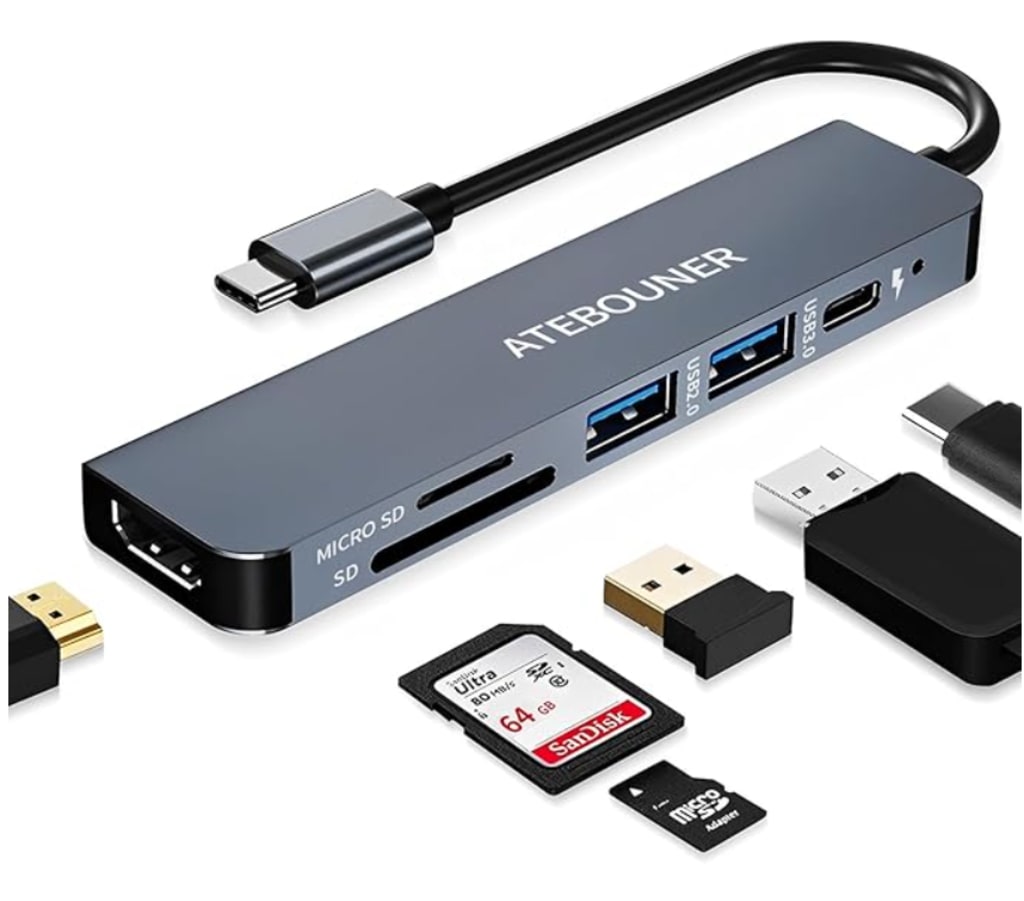
Remote work has become normal for many professionals around the world. People across industries — from IT and HR to design, finance, and education — now rely on laptops to complete their daily tasks. While laptops are powerful and portable, they often come with a downside: limited ports. This common hardware limitation can disrupt workflow, lower productivity, and create frustration — especially for workers who connect multiple devices.
This is where a USB-C multiport hub becomes an indispensable tool for anyone working remotely.
The Challenge of Limited Laptop Ports
Modern laptops prioritize slim design and mobility, which often means sacrificing the number and variety of ports. While this minimalist approach is appealing from a design perspective, it introduces a very practical problem: what do you do when you need more connectivity than your laptop offers?
Here are some common limitations:
Only one or two USB-C ports
Lack of HDMI or display ports
No Ethernet port for wired internet
Limited USB-A ports for older accessories
For remote workers, not having enough ports means constantly unplugging and replugging devices throughout the day. This interrupts your focus and reduces efficiency.
What a USB-C Multiport Hub Does
A USB-C multiport hub expands your laptop’s connectivity without adding clutter. Instead of being limited to a few connections, a hub allows you to plug in multiple devices at once — all through a single USB-C port.
Typical features of a multiport hub may include:
Multiple USB-A (standard USB) ports
HDMI or DisplayPort for external monitors
Ethernet port for wired internet
SD and microSD card readers
Additional USB-C ports for power delivery
By consolidating connectivity, a multiport hub effectively transforms a minimalist laptop into a productive workstation.
Why This Matters for Remote Work
1. Faster Setup and Transition Between Workspaces
Remote workers often have different work environments: a dedicated home office, a coworking space, or a café. A USB-C hub makes it easy to shift between locations without spending time plugging and unplugging cables one by one. Once everything is connected through the hub, your workstation feels consistent and ready.
This setup is especially helpful on days with back-to-back meetings or multiple tasks requiring different accessories.
2. Better Focus and Fewer Interruptions
Every time you disconnect and reconnect accessories, it interrupts your flow. Whether it’s switching between a mouse, external storage, or a second screen, these small disruptions can break concentration and make workflow feel disjointed.
With a multiport hub:
You plug devices in once
Everything stays connected
You avoid constant swapping
This allows you to focus on work rather than managing cables.
Improved Communication and Professionalism
Remote work depends heavily on virtual collaboration via Zoom, Teams, or other video platforms. A USB-C hub lets you connect quality accessories like external webcams, headsets, or microphones — giving you clearer audio and video during meetings.
Better equipment results in:
Clearer communication
Fewer technical interruptions
More professional interactions
This is especially important when working with clients, teams across time zones, or during presentations.
Ideal Scenarios for Using a USB-C Hub
A USB-C multiport hub benefits different types of remote workers:
• Hybrid Workers
If you split time between home and office, a hub helps you maintain a consistent setup wherever you work.
• Students and Freelancers
Multiple connections for storage, displays, or input devices help you stay efficient.
• Digital Nomads
Portability is key for those working from varied locations. A compact hub fits easily in a laptop bag.
• IT Professionals
Connecting devices for testing or demonstrations becomes seamless, saving time and reducing cable clutter.
Practical Tips for Using a Multiport Hub
Here are some easy ways to get the most out of your hub:
Connect your primary input devices first (keyboard and mouse)
Add an external display for increased workspace
Use wired ethernet when Wi-Fi is unstable
Keep a card reader attached for quick access to files
These small habits help ensure your workspace stays organized and productive.
Final Thoughts
Remote work is about flexibility and adaptability. While laptops are essential for mobility, their limited ports can sometimes feel like a restriction. A USB-C multiport hub gives you the power to connect what you need, when you need it — without constantly swapping cables.
Instead of treating connectivity as a technical challenge, a hub transforms your laptop into a full-featured workstation. It’s one of those simple tools that can make a big difference in your daily workflow — helping you reduce frustration, improve focus, and work more efficiently from any location.
Whether you’re new to remote work or have been doing it for years, a USB-C multiport hub is worth considering as part of your setup.
About the Creator
Keep reading
More stories from Bahati Mulishi and writers in Lifehack and other communities.
Why Noise-Cancelling Headphones Are Essential for Remote Work
Remote work has changed the way people experience their workday. While working from home offers flexibility and comfort, it also introduces new challenges — one of the biggest being noise. From traffic sounds and construction to conversations at home, background noise can quickly disrupt focus and reduce productivity.
By Bahati Mulishi2 days ago in Lifehack
The Invisible Scar: Navigating Life and Love After Infidelity
Late one evening, I received a call from a close friend. Through muffled sobs, she shared the news that has become an all-too-familiar ghost in modern relationships: "He’s been cheating. I checked his phone... it’s been going on for six months."
By Elena Vance 4 days ago in Lifehack
Kale in the Home Garden - Growing a Resilient Green from Seed to Harvest
Kale has a way of thriving quietly. It doesn’t demand attention, doesn’t rush its growth, and doesn’t punish small mistakes, qualities that make it one of the most dependable vegetables in a home garden. For beginner gardeners, kale often becomes the first leafy green that truly feels successful.
By The Brown Chair6 days ago in Lifehack



Comments
There are no comments for this story
Be the first to respond and start the conversation.