
How to Change Background Color on Instagram Story?
Enhance Your Instagram Presence: Customize Story Backgrounds for Maximum Impact

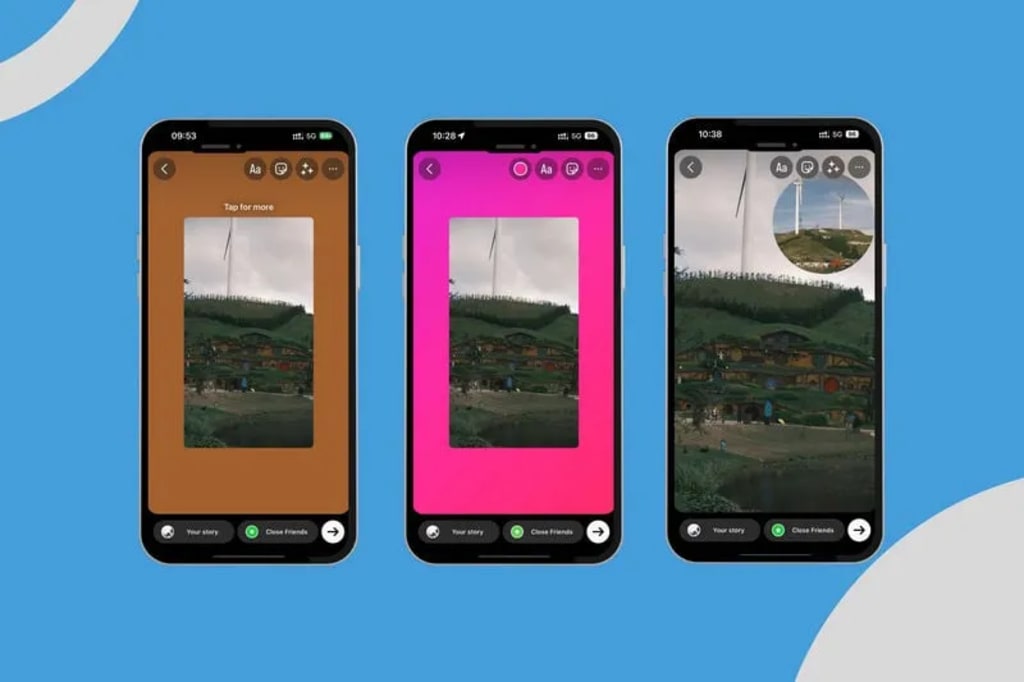
Looking to enhance the allure of your Instagram stories? Whether you’re capturing moments of your everyday life or advertising your business, a custom background color can add a captivating touch to your posts. This guide will provide a step-by-step process on how to modify the background color in Instagram Stories, offering multiple easy techniques to ensure your visuals grab viewers’ attention.
1. How to Change Background Color on Instagram Story?【3 Methods】
When you upload a post on Instagram, the platform automatically choose a default color background for you. But you’re not confined to this preset choice. You can effortlessly switch to a solid color, a gradient, or even your personal photo by utilizing Instagram’s built-in functionalities.
1.1 Change Instagram Story Background Color to a Solid Color
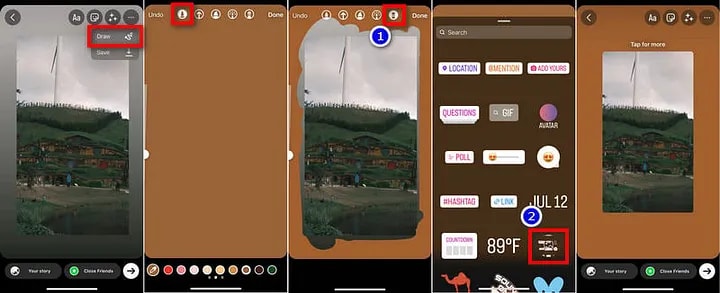
Click the “Your Story” icon in the upper left corner of Instagram and upload a photo.
Click the “…” icon in the upper right corner and select the “Draw” option.
Instagram will select the first Pen tool at the top by default. Use the color eyedropper tool to customize the background color Instagram Story or select from the default colors at the bottom.
Press and hold the screen for a few seconds and your IG story background color will change.
Click the Eraser option on the toolbar. Drag your finger across the screen to erase the color of the overlay photo.
This method can create a DIY solid color IG background. / Click the Done option to return to the original interface. Click the Sticker option, find the photo stickers, and re-upload your photo.
1.2 Change Instagram Story Background Color to a Gradient Color
Swipe right on the Instagram homepage to open the camera, then select the “Aa Create” option on the left.
Instagram story background color will automatically generate a gradient color.
Click the small circle in the lower right corner to change background color Instagram story.
Click on the stickers above, select a photo sticker, and finally upload your photo.
1.3 Change Instagram Story Background Color to Your Own Photo
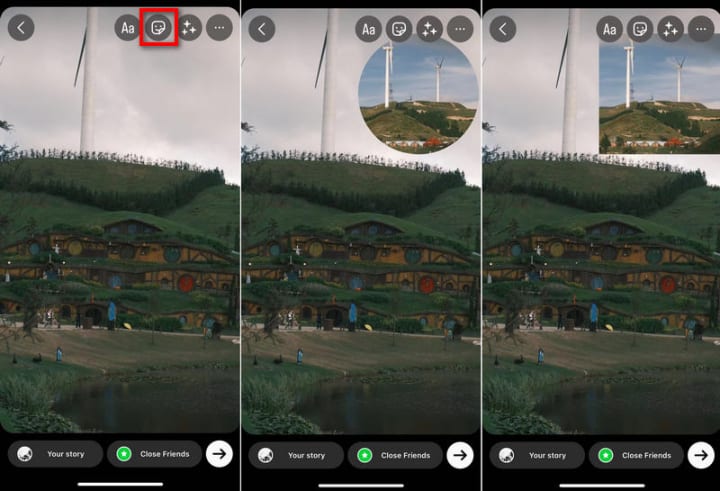
Open Instagram Story and upload the image you want to use as Instagram Story Background.
Upload a foreground image via Photo Sticker.
You can use the pinch-to-zoom gesture to resize the image, and tap the image to adjust the shape of the presentation.
2. Bonus Tip: How to Change the Background Color of a Picture on Instagram?
In addition to using the built-in features provided by Instagram, you can also change background color Instagram story easily with the help of photo editing tools. AVCLabs PhotoPro AI is one of the best tools for changing background color, which not only allows you to change Instagram story background color, but also offers powerful AI replacements that can give your Instagram photos a whole new look.
AVCLabs PhotoPro AI provides an intuitive interface that makes changing background color on instagram story with the AI Replacement feature very simple. You can choose its AI tools to accurately detect and separate the foreground and background, enabling you to replace the background color and content without the need for professional knowledge and skills. AVCLabs PhotoPro AI ensures that every background replacement and image adjustment is smooth and natural, making your Instagram story stand out even more.
Key Features of AVCLabs PhotoPro AI
- Advanced AI algorithms for automatic background detection and removal
- Automatically detect and replace any part of the image with new AI-generated objects.
- Increase image resolution by 2x, 3x, 4x without losing quality
- Colorize B&W photos to make it come to life again
- Advanced AI algorithms for automatic background detection and removal
- Automatically optimizes photo quality and clarity using AI algorithms
Read more: avclabs.com
About the Creator
Keep reading
More stories from Madeline and writers in Photography and other communities.
Why Raw, Real Photos Are Winning in the Age of AI Imagery
In 2026, candid and authentic photography isn’t just a style — it’s shaping the way we understand visual storytelling. After years of highly polished imagery dominating social feeds and photo galleries, the tide has shifted. Today’s photographers — from professionals shooting weddings and brands to street and documentary practitioners — are embracing imperfection, emotion, and real moments as core creative values. This evolution reflects broader cultural currents: people now crave honesty, connection, and human presence in images more than ever before
By Stories Today3 days ago in Photography
What Are the Best Action Cameras in 2026?
In a world where moments disappear in seconds, capturing them perfectly has never been more important. Whether you're hiking through misty mountains, diving into crystal-clear waters, documenting your travels, vlogging your daily life, or racing down rugged trails, an action camera gives you the power to relive every thrilling second.
By Labiba6 days ago in Photography
If You Write A Book, Don’t Tell Anyone
There are days when I’m grateful Amazon doesn’t tell me specifically who has bought my book and who hasn’t. If they did, I would be heartbroken when I read the list and noticed all the important names in my life were not on my list of customers.
By Ellen Frances6 days ago in Writers




Comments (2)
Nice article
Thanks for sharing